Swati Mishra

Updated 2 months ago

A Simplified Approach to Screen Brightness Control

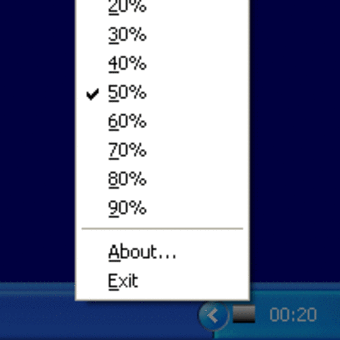
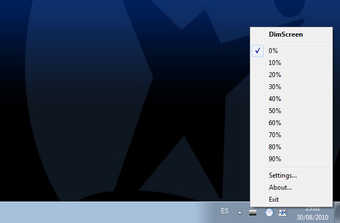
DimScreen is a small freeware utility created by Skrommel that allows Windows users to quickly manage screen brightness. Instead of relying on hardware keys or control panel menus, it lets users dim their displays directly from the system tray or by using hotkeys. Its portable design means it requires no installation and can be run from a USB stick for added convenience.

Straightforward Features for Everyday Use

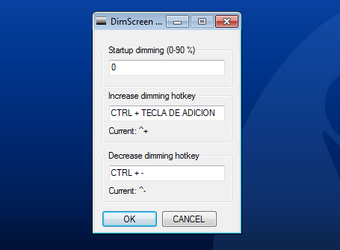
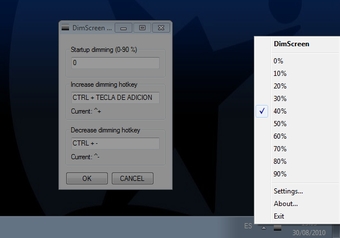
The program offers ten preset brightness levels, from 0% to 100%, which can be cycled through by right-clicking the tray icon or pressing keyboard shortcuts. This step-based approach makes it easy to reduce eye strain in darker environments or quickly adjust brightness for presentations. DimScreen also remembers the last setting when restarted, providing a consistent experience across sessions.

Limitations to Keep in Mind

DimScreen’s simplicity means it lacks some advanced functions. Brightness can only be adjusted in fixed steps, with no option for precise percentage control or per-monitor adjustments. Because it uses an overlay method, it may conflict with certain games or full-screen programs. Unlike more modern alternatives, it also doesn’t provide features such as blue light filtering or scheduling.

A Lightweight Solution for Basic Brightness Control

For users who want a quick, portable, and free way to dim their screens, DimScreen is a reliable tool. Its minimal design, portability, and hotkey support make it effective for everyday use. However, users needing more granular control, per-display customization, or advanced features will find other tools better suited to their needs.

Swati Mishra

Swati has over a decade of experience in content strategy, SEO, and editorial writing across technology and travel. She specializes in technical reviews, structured guidelines, and long-form pieces. Her work focuses on clear organization, search intent, and practical takeaways for readers evaluating software and digital tools.


  • Pros

    • Free, portable, and lightweight
    • Simple hotkey and tray-based brightness control
    • Remembers last used brightness level
    • Useful for reducing eye strain in dark settings
  • Cons

    • Limited to ten preset brightness levels
    • No per-monitor or fine percentage adjustments
    • Overlay may cause issues with some full-screen apps
    • Lacks advanced features like scheduling or blue light filtering
 0/4

App specs

  • License

    Free

  • Version

    1.1

  • Latest update

  • Platform

    Windows

  • OS

    Windows XP

  • Language

    English

  • Downloads

    1.6M

    Last month's downloads

    • 46.7K
  • Size

    431.40 KB

  • Developer

Program available in other languages


User reviews about DimScreen

3.7

28 reviews

Add review

Main reviews for you

  • Anonymous user

    You just need to install it again because it's automatically uninstalling when you closed or shutdown ur pc, i made a shortcut of the installer then put it in my desktop for easy access, so far so good

  • Anonymous user

    How to delete,1. Go to Task Manager and END TASK the background process.2. Go to Downloads and delete the config file and Downloader.3. Sit back and enjoy:)

  • Anonymous user

    I turn it off, but can't turn on again, any tips? Where's even the app installed?

  • Anonymous user

    This application is amazing. I don't understand how some of these people reviewing it cannot figure out how to use it. It is very simple. Look at your system tray and right click the dimscreen icon, from there you can increase, decrease, or exit. It is that simple. 10/10 app, I use it every night.

  • Anonymous user

    It does dim the screen, but I don't have any control of it, no user interface, nothing. Feels stupid.

  • Anonymous user

    In task manager, you'll get in under processes -> background processes, can end task from there

More

You may also like

Alternatives to DimScreen

Explore Apps

Latest articles

Laws concerning the use of this software vary from country to country. We do not encourage or condone the use of this program if it is in violation of these laws.
Softonic

Is DimScreen safe?

99/100

Score result: Clean

This file passed a comprehensive security scan using VirusTotal technology. It is safe to download.

  • Virus free
  • Spyware free
  • Malware free
  • Verified by Security Partners

    VirusTotal logo

Scan Info

Last scan
Tuesday, April 30, 2024
Scan provider
VirusTotal · Full report

File Integrity

File
DimScreen.exe
SHA256
a8c60ad5ea2f47baa7b592798108b6140b5832edb5ecdcb7aa1b86fb2df53df5
SHA1
615cc039b6fa0e0363cd7b9275391af4b4f09606

Softonic security commitment

DimScreen has been thoroughly scanned by our advanced security systems and verified by industry-leading partners. This file comes from the official developer and has passed all our security checks, showing no signs of viruses, malware, or spyware.