Icon of program: DimScreen

DimScreen for Windows

Free Download for Windows

View an ad to download for free

Swati Mishra

Updated last month

Simple brightness dimmer tool

DimScreen is a free utility tool that allows Windows users to manage screen brightness. Instead of hardware keys or control panel menus, it lets you dim your displays directly from the system tray or via hotkeys; it requires no installation and can be run from a USB stick for added convenience.

Top Recommended Alternative

Straightforward features

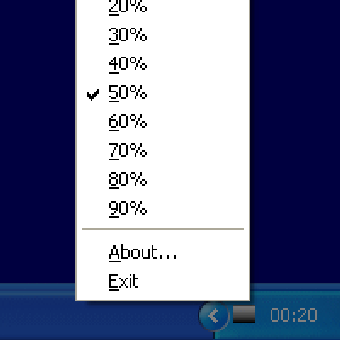
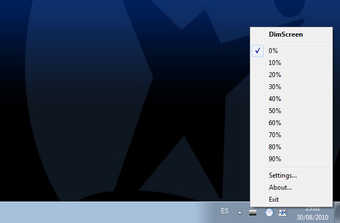
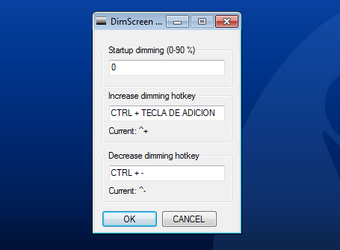
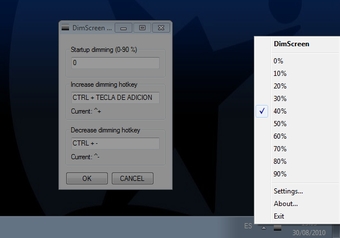
DimScreen offers 10 preset brightness levels, from 0% to 100%, which can be cycled through by right-clicking the tray icon or pressing keyboard shortcuts. This step-based approach makes it easy to reduce eye strain in darker environments or quickly adjust brightness for presentations. It also remembers the last setting when restarted, providing a consistent experience across sessions, with no need to toggle the same settings every time you boot.

UI wise, it’s simple and non-intrusive, as it exists mostly on the lower part of your desktop. It acts like a quick toggleable tool, rather than a fully-blown program, saving you the tedious hassle of reopening and closing it, unlike similar apps with has a dedicated dashboard. While it isn’t bad to have one, this program’s minimalist approach saves time and effort

However, its simplicity means it lacks some advanced functions. Brightness can only be adjusted in fixed steps, with no option for precise percentage control or per-monitor adjustments. Because it uses an overlay method, it may conflict with certain games or full-screen programs. Unlike more modern alternatives, it also lacks features such as blue-light filtering or scheduling—a consequence of its minimal approach.

A lightweight solution for basic brightness control

For users who want a quick, portable, and free way to dim their screens, DimScreen is a reliable tool. Its minimal design, portability, and hotkey support make it effective for everyday use. However, users needing more granular control, per-display customization, or advanced features will find other tools better suited to their needs.

Swati Mishra

Swati has over a decade of experience in content strategy, SEO, and editorial writing across technology and travel. She specializes in technical reviews, structured guidelines, and long-form pieces. Her work focuses on clear organization, search intent, and practical takeaways for readers evaluating software and digital tools.

  • Pros

    • Simple hotkey and tray-based brightness control
    • Remembers last used brightness level
    • Useful for reducing eye strain in dark settings
  • Cons

    • Limited to 10 preset brightness levels
    • No per-monitor or granular adjustments
    • Overlay may cause issues with some full-screen apps
    • Lacks advanced features like scheduling or blue light filtering
 0/4

App specs

  • Developer

  • License

    Free

  • Version

    1.1

  • Latest update

  • Platform

    Windows

  • OS

    Windows 7

  • Language

    English

  • Downloads

    1.9M

    Last month's downloads

    • 21.9K
  • Size

    431.40 KB

Program available in other languages


Icon of program: DimScreen

DimScreen for PC

Free Download for PC

View an ad to download for free


User reviews about DimScreen

3.7

29 reviews

Add review

Main reviews for you

  • Ivan Nowak

    dimscreen

    Why do i have to download it daily

  • Anonymous user

    You just need to install it again because it's automatically uninstalling when you closed or shutdown ur pc, i made a shortcut of the installer then put it in my desktop for easy access, so far so good

  • Anonymous user

    How to delete,1. Go to Task Manager and END TASK the background process.2. Go to Downloads and delete the config file and Downloader.3. Sit back and enjoy:)

  • Anonymous user

    I turn it off, but can't turn on again, any tips? Where's even the app installed?

  • Anonymous user

    This application is amazing. I don't understand how some of these people reviewing it cannot figure out how to use it. It is very simple. Look at your system tray and right click the dimscreen icon, from there you can increase, decrease, or exit. It is that simple. 10/10 app, I use it every night.

  • Anonymous user

    It does dim the screen, but I don't have any control of it, no user interface, nothing. Feels stupid.

More

You may also like

Alternatives to DimScreen

Explore Apps

Latest articles

Laws concerning the use of this software vary from country to country. We do not encourage or condone the use of this program if it is in violation of these laws.
Softonic

Is DimScreen safe?

99/100

Score result: Clean

This file passed a comprehensive security scan using VirusTotal technology. It is safe to download.

  • Virus free
  • Spyware free
  • Malware free
  • Verified by Security Partners

    VirusTotal logo

Scan Info

Last scan
Tuesday, April 30, 2024
Scan provider
VirusTotal · Full report

File Integrity

File
DimScreen.exe
SHA256
a8c60ad5ea2f47baa7b592798108b6140b5832edb5ecdcb7aa1b86fb2df53df5
SHA1
615cc039b6fa0e0363cd7b9275391af4b4f09606

Softonic security commitment

DimScreen has been thoroughly scanned by our advanced security systems and verified by industry-leading partners. This file comes from the official developer and has passed all our security checks, showing no signs of viruses, malware, or spyware. For more information, visit our Security and Trust Center

Signed in to Softonic as